Back to Blog

Informative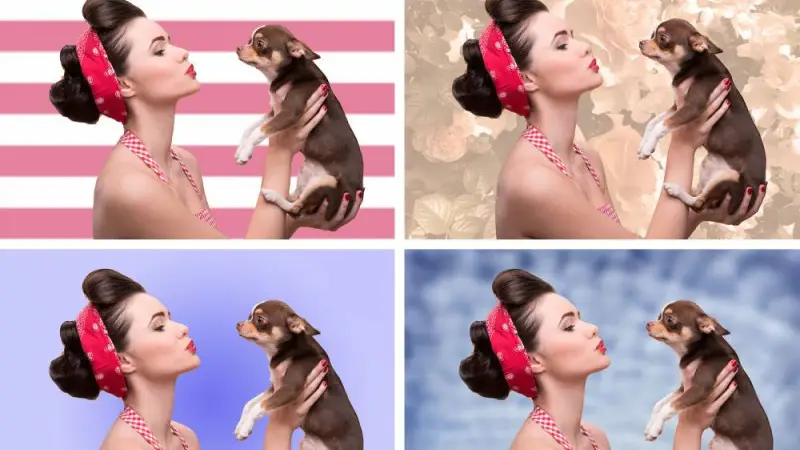
How to Remove Background from Image in Photoshop (Complete Guide for eCommerce)
July 23, 2025How to Remove Background from Image in Photoshop – Complete Professional Guide
Removing the background from an image is one of the most important techniques in modern photo editing. Especially in eCommerce product photography, a clean background can completely change the visual quality of a product image.
As a professional designer working daily with image editing projects, I frequently handle background removal for product photos, fashion photography, and commercial marketing images. In this guide, I will explain how background removal works in Photoshop and why it is essential for businesses and photographers.
This guide is written from my real working experience as a photo editor at Clipp Asia, where we process thousands of images for global clients.

How to Remove Background from Image in Photoshop – Complete Professional Guide
Removing the background from an image is one of the most important techniques in modern photo editing. Especially in eCommerce product photography, a clean background can completely change the visual quality of a product image.
As a professional designer working daily with image editing projects, I frequently handle background removal for product photos, fashion photography, and commercial marketing images. In this guide, I will explain how background removal works in Photoshop and why it is essential for businesses and photographers.
This guide is written from my real working experience as a photo editor at Clipp Asia, where we process thousands of images for global clients.
What is Background Removal in Photo Editing?
Background removal is the process of separating the main subject of an image from its background. After removing the background, editors can:
- Replace it with a white background
- Create a transparent background
- Add a custom studio background
- Insert the product into marketing designs
This technique is widely used in:
- eCommerce product images
- Fashion photography
- Jewelry photography
- Advertising design
- Social media marketing
According to Adobe Photoshop, clean background images help brands maintain a professional and consistent visual identity.
External resource:
https://www.adobe.com/products/photoshop.html

Why Background Removal is Important for eCommerce
Today most consumers buy products online from platforms like Amazon, eBay, Shopify, and Etsy. In online shopping, buyers cannot physically touch products, so product images become the main selling factor.
Professional background removal helps to:
✔ Focus attention on the product
✔ Remove distracting objects
✔ Improve visual clarity
✔ Increase buyer trust
✔ Boost conversion rates
From my experience editing product photos daily, clean white backgrounds often increase product sales significantly.
How to Remove Background from Image in Photoshop
There are several ways to remove a background in Photoshop. Below is one common method using the Background Eraser Tool.
Method 1: Remove Background Using Background Eraser Tool
Step 1
Open your image in Photoshop and unlock the background layer.
Step 2
Duplicate the layer to keep the original safe.
Step 3
Select the Background Eraser Tool from the toolbar.
Step 4
Adjust the tool settings such as:
- Brush size
- Tolerance
- Sampling mode
Step 5
Zoom into the image and carefully erase the unwanted background.
Step 6
Refine edges to make the cut look natural.
Step 7
Export the image with a transparent background or a new background layer.
However, this method works best for simple images. Complex images require professional techniques like clipping paths or image masking.
Professional Background Removal Techniques
At Clipp Asia, we mainly use two advanced techniques for background removal.
1. Clipping Path (Best for Hard Edges)
Clipping path is a manual technique using the Photoshop Pen Tool to create a vector path around an object.
This method is ideal for:
- Product photography
- Electronics
- Furniture
- Jewelry
- Accessories
Our editors draw the path manually to ensure pixel-perfect accuracy.
2. Photoshop Image Masking (Best for Complex Objects)
Image masking is used when objects contain soft edges or fine details.
Examples include:
- Hair
- Fur
- Fabric
- Transparent objects
- Glass products
Masking techniques include:
- Layer masking
- Alpha channel masking
- Color masking
- Transparency masking
These methods preserve delicate details while removing the background.
Creating White Background for Product Images
A pure white background is the industry standard for eCommerce product photos.
Platforms like Amazon require:
- RGB 255 white background
- High-resolution images
- Clear product visibility
Benefits of white backgrounds include:
✔ Clean professional appearance
✔ Improved product focus
✔ Consistent product catalog design
✔ Better marketplace approval
Besides white, some brands use black or grey backgrounds for luxury products.

Background Removal Services for Businesses
Many businesses outsource background removal because editing thousands of images manually takes time and expertise.
Professional services usually include:
- Background removal
- Clipping path
- Image masking
- Shadow creation
- Color correction
- Cropping and resizing
- Dust and scratch removal
At Clipp Asia, we combine manual editing and advanced Photoshop tools to deliver high-quality results.
Why Businesses Choose Professional Background Removal Services
From my daily experience as a designer, I see many companies struggle with inconsistent product images.
Professional editing services help businesses:
✔ Maintain consistent product catalogs
✔ Improve product presentation
✔ Meet marketplace image requirements
✔ Save time and production cost
✔ Increase online sales
A clean and professional product image can make a huge difference in customer purchasing decisions.
Background removal is more than just an editing technique — it is a critical step in professional image presentation.
Whether you are a photographer, eCommerce seller, or a digital marketer, clean product images help attract customers and increase engagement.
As someone who works with photo editing every day, I can confidently say that precise clipping paths, masking, and color correction make the biggest difference in professional product images.
If you need expert help with product image editing, Clipp Asia provides high-quality background removal and photo retouching services for global clients.
Recent Posts
Jul 13, 2026
Multi Clipping Path Services for Color Correction and Retouching
Jul 13, 2026
Professional Retouching Services in Dubai vs Basic Photo Editing: What’s the Difference?
Jul 12, 2026
Headshot AI Prompts That Actually Work: Examples for Clean Business Photos
Jul 8, 2026
What Is Product Photography? A Complete Beginner’s Guide
Jul 7, 2026
Best Clipping Path Service Providers: How to Choose the Right One
Fast, Flawless, and Affordable
Ready to Get Pixel-Perfect Results?
Tired of slow, sloppy edits? Upload your first 5 images for free and see the quality firsthand. No commitment, no credit card required.
Free trial — no card needed
4.9 / 5 rating from 500+ reviews
How it works
- 1
Upload your images
Send 5 photos for free
- 2
We edit them
Expert editors deliver in 24hrs
- 3
Review & approve
Love the quality, order more
Avg. turnaround12 - 24 Hours