Back to Blog
Guides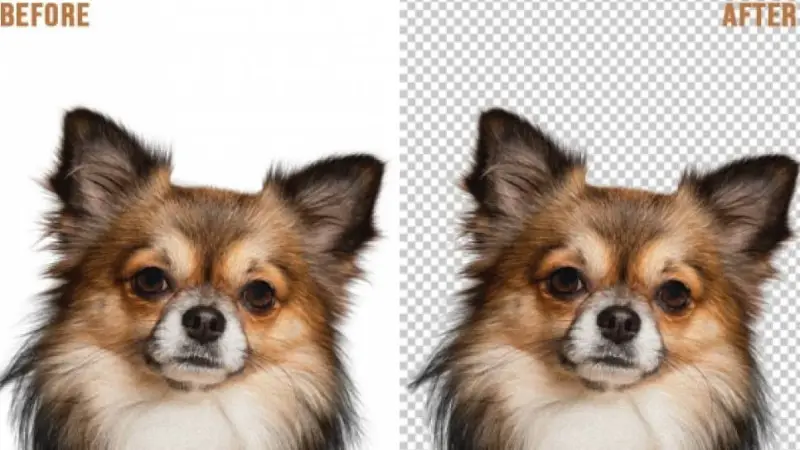
Image Masking and Hair Masking Services USA, UK, SPAIN
July 23, 2025The image masking service is basically for removing fur or hair from the image of a product or model. This is an alternative to the image clipping service which helps to remove the background in this way. This is a highly criticized image editing technique that has been completely done by us.
Thus the photo Masking service comes up to do this type of work more accurately and perfectly. Image Masking is the best procedure to cut an image from its background without changing its shape. This background-removing process is so critical and in these types of image editing, a clipping path cannot be applied to remove the background. We have a dedicated and skilled designer for Photoshop masking service and they have done this work with the highest level of expertise.

Types of Image Masking Services:
1. Photoshop Layer Masking
2. Alpha Channel Masking
3. Fur and Hair Masking
4. Refine Edge Masking
5. Transparent object masking
6. Translucent Object Masking
7. Object Masking
8. Color Masking
In this service, we select the entire hairy, foggy, or blurry region and apply our image masking service. We do alpha-layer masking according to each client's requirements so that there is an extra layer of masking that can be replaced in any background for future use. Pretty cool, isn't it? As a very popular and widely used software for editing Adobe Photoshop graphics, we use its paid version to get flawless performance. There will be no shortage of quality in our image masking services.
There are many ways to mask images like channel masking, knock-out masking, extract masking, fine edge masking, etc. We first categorize the images we get from our clients.
We then analyze and decide which type of image masking service can be applied. No worries, we have the skills to do this and can apply the right kind of image masking for your images. However, you can check out the details about our image masking method in this blog where you can learn and teach how to do image masking. This is about our image masking service.
Masking for Transparent products such as glasses, bottles, glass jars, pure water, and lenses images services
Transparent products such as glasses, bottles, glass jars, pure water, and lenses need masking to remove backgrounds. In terms of visibility and transparency, materials make the difference between transparent and translucent subjects.
Transparent materials require partial light formation and partial imagery. Image masking provides flawless background removal for transparent and landscape product images.
Photoshop Masking service is such an ingenious way of image manipulation using the Photoshop Pen Tool.
The Key Services of Image Masking Are:
Layer Masking
Clipping Mask
Masking Alpha Channel
Transparent Object Masking
Let me precisely describe those for you.
Layer masking is a remarkable way to hide or reveal a certain portion of the image. A skilled artist applies this technique in such a way by using Photoshop selection or painting tools.
A Clipping Mask is a set of layers to apply for a mask. This is such a technique that makes the areas noticeable when keeping in an itemized shape.
Alpha Channel Masking is a process applied for converging one of the pixel's colors with another one. It allows defining the resulting color important for animation allowing the creation of rectangular shapes that seem irregular.
Transparent Object Masking involves masking by detaching the entire background from the image. Then an expert with sound knowledge changes the photo with a new background. Thus, it gives a translucent or transparent look with visible color.
Besides all those, fur and hair masking in Photoshop, masking color, and vector masking in Photoshop are notable.
.After a struggling few months, our game-changing strategy globally makes us the best image masking service provider.
Professional Image Masking service In USA

Image masking is a key service in graphic design, essential for over 40% of online consumers who need their products displayed on transparent and consistent backgrounds. Busy photographers can save time and grow their business by using this service.
Why Use Image Masking?
Image masking isolates or modifies subjects without damaging pixels. It's crucial for complex edges like hair, dolls, or fabrics.
Here are some types of image masking services:
Skin and Hair Masking: Removes objects with smooth edges like hair and fur.
Alpha Channel Masking: Removes backgrounds from complex objects and corrects color, brightness, contrast, or exposure.
Transparent Object Masking: Handles difficult objects like glass or water, ensuring natural-looking transparency.
Translucent Object Masking: Works with semi-see-through objects like sunglasses or frosted glass, which are harder to mask than opaque ones.
Photoshop Refine Edge Masking: Corrects edge inconsistencies when placing cut-out objects on new backgrounds.
Level Masking: Hides unwanted parts of a photo layer, allowing for creative and artistic results.
Enhance Your Product Photos for E-commerce
At ClippAsia, we offer affordable image background removal services to help e-commerce businesses present their products in the best light. Our services make your product images look professional and clean, ready for your online store.
Background Removal: Remove unwanted backgrounds from your product photos.
Improve Product Appeal: Make your products stand out with a clean and clear background.
When to Apply Image Masking?
Use image masking when a model's photo taken on a gray background needs a different background. Clipping paths alone can't handle details like hair or fur, but Photoshop image masking can. For simple background removal with hard-edged images, clipping paths are suitable.
Image masking is one of the most critical tasks in photo editing services, ensuring perfect isolation of backgrounds for complex subjects.
Professional Image Masking Services in the USA
At ClippAsia, we offer professional image masking services in the USA, perfect for e-commerce businesses. Our services help you create clean and detailed product images, making them ready for your online store.
Image Masking: Remove complex backgrounds from your product photos.
Detailed Editing: Ensure your products look sharp and professional.
Tailored for Professional Photographers
Professional photographers benefit from our detailed image masking services. We handle complex editing tasks, allowing you to focus on capturing stunning photos.
Complex Editing: Expertly remove intricate backgrounds from your photos.
Save Time: Let us handle the editing while you focus on photography.
Recent Posts
Jul 13, 2026
Multi Clipping Path Services for Color Correction and Retouching
Jul 13, 2026
Professional Retouching Services in Dubai vs Basic Photo Editing: What’s the Difference?
Jul 12, 2026
Headshot AI Prompts That Actually Work: Examples for Clean Business Photos
Jul 8, 2026
What Is Product Photography? A Complete Beginner’s Guide
Jul 7, 2026
Best Clipping Path Service Providers: How to Choose the Right One
Fast, Flawless, and Affordable
Ready to Get Pixel-Perfect Results?
Tired of slow, sloppy edits? Upload your first 5 images for free and see the quality firsthand. No commitment, no credit card required.
Free trial — no card needed
4.9 / 5 rating from 500+ reviews
How it works
- 1
Upload your images
Send 5 photos for free
- 2
We edit them
Expert editors deliver in 24hrs
- 3
Review & approve
Love the quality, order more
Avg. turnaround12 - 24 Hours