Back to Blog


Photography Tips and Tricks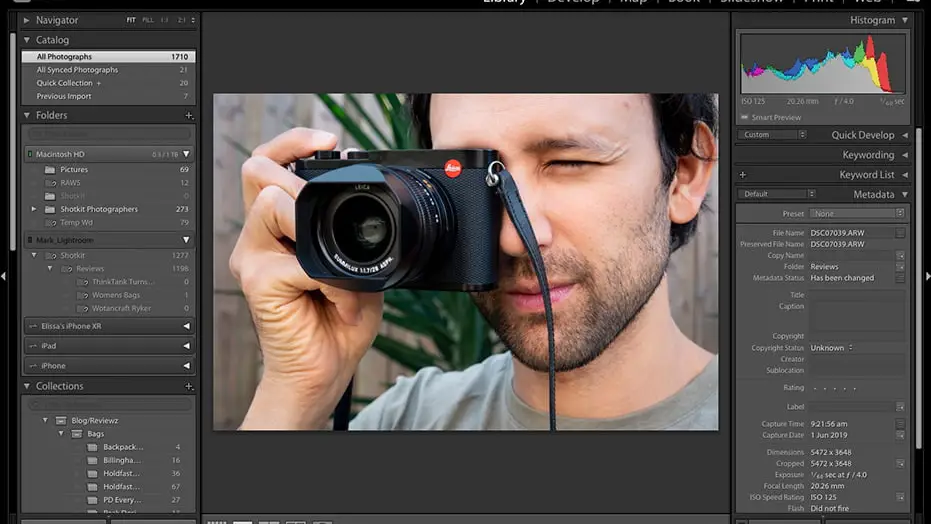
Best Photo Editing Software for Professionals
October 20, 2025Let's face it – raw photos straight from your camera rarely tell the full story. Whether you're a wedding photographer touching up portraits or a marketing pro creating eye-catching visuals, photo editing software is your best friend.
Good editing software doesn't just fix problems. It brings out the magic hiding in your shots. The right tool can turn an okay photo into something that stops people in their tracks.
Here's the thing: you don't always need to break the bank. Sure, premium software packs more punch, but some free options can hold their own against the big names. We'll walk you through both worlds so you can pick what works for your wallet and workflow.
Free Photo Editing Software for Professionals
Just because it's free doesn't mean it's cheap quality. These tools prove you can get professional results without spending a dime upfront.
GIMP (GNU Image Manipulation Program)
Think of GIMP as Photoshop's scrappy cousin who went to art school. It's got serious power under the hood.
What you get: Advanced editing tools, layers, filters, and tons of plugins. Since it's open-source, developers keep adding cool stuff all the time.
The good:
-
Won't cost you anything, ever
-
Works on Windows, Mac, and Linux
-
Huge community means lots of tutorials and help
The not-so-good:
-
Interface feels clunky compared to modern apps
-
Takes time to learn if you're used to other software
Perfect for: Freelancers and small studios who need Photoshop-level tools but can't swing the monthly subscription.
Version: GIMP 2.10.36 (latest stable) Download: gimp.org Price: Free forever
Darktable
This one's a photographer's dream. If you shoot in RAW format (and you should!), Darktable handles those files like a champ.
What you get: RAW processing that doesn't mess with your original files, plus color correction and exposure tools that'll make your shots sing.
The good:
-
Fantastic for batch editing multiple photos
-
Non-destructive editing keeps originals safe
-
Works great with most camera brands
The not-so-good:
-
Limited when it comes to detailed retouching
-
Learning curve can be steep for beginners
Perfect for: Photographers who want a solid Lightroom alternative without the monthly fees.
Version: Darktable 4.6.1 Download: darktable.org Price: Free and open-source
Canva (Free Plan)
Don't sleep on Canva just because it looks simple. For quick edits and social media content, it's surprisingly handy.
What you get: Drag-and-drop editing, thousands of templates, basic photo filters, and text overlay tools.
The good:
-
Super easy to learn – you'll be editing in minutes
-
Works in your browser, no downloads needed
-
Great templates save tons of time
The not-so-good:
-
Can't handle complex editing tasks
-
Free version has limited storage and features
Perfect for: Marketing teams and social media managers who need quick, professional-looking graphics.
Version: Web-based (always updated) Download: canva.com Price: Free plan available, Pro starts at $14.99/month
Premium Photo Editing Software for Professionals
When you need the heavy hitters, these paid options deliver the goods. They're what most pros reach for when the stakes are high.

Adobe Photoshop
The king of the hill. If you've heard of photo editing, you've heard of Photoshop.
What you get: Everything. Seriously. Layers, masks, AI-powered tools, 3D editing, video support – this thing does it all.
The good:
-
Industry standard means everyone knows it
-
Crazy amount of tutorials and resources online
-
New AI features keep pushing boundaries
The not-so-good:
-
Subscription model adds up over time
-
Can feel overwhelming for simple tasks
-
Resource-heavy on older computers
Perfect for: Professional photographers, graphic designers, and anyone who needs the most powerful editing tools available.
Version: Photoshop 2024 (25.3.1) Download: adobe.com/products/photoshop Price: $22.99/month (Photography plan includes Lightroom)
Adobe Lightroom
Photoshop's organized sibling. Built specifically for photographers who deal with hundreds of photos at once.
What you get: RAW processing, batch editing, photo organization, and presets that speed up your workflow like crazy.
The good:
-
Makes organizing thousands of photos actually manageable
-
Batch editing saves hours of work
-
Cloud sync lets you edit anywhere
The not-so-good:
-
Monthly subscription required
-
Limited for heavy retouching work
-
Can get slow with huge photo libraries
Perfect for: Wedding photographers, event shooters, and anyone who needs to edit lots of similar photos quickly.
Version: Lightroom Classic 13.1, Lightroom CC (cloud-based) Download: adobe.com/products/photoshop-lightroom Price: Included in Photography plan ($22.99/month)
Capture One Pro
The secret weapon of high-end studios. If color accuracy is everything to you, this is your tool.
What you get: Best-in-class RAW processing, tethered shooting support, and color tools that'll blow your mind.
The good:
-
Color handling that makes other software jealous
-
Tethered shooting perfect for studio work
-
Faster performance than Lightroom with large files
The not-so-good:
-
Pricey upfront cost
-
Steeper learning curve
-
Smaller community means fewer tutorials
Perfect for: Studio photographers, fashion shooters, and pros who need pixel-perfect color reproduction.
Version: Capture One 23 (16.4.2) Download: captureone.com Price: $299 one-time purchase, or $24/month subscription
Affinity Photo
The budget-friendly alternative that doesn't feel cheap. Think of it as Photoshop's practical cousin.
What you get: Professional-grade editing tools, RAW support, and advanced features without the monthly fees.
The good:
-
One-time purchase – no subscriptions!
-
Nearly as powerful as Photoshop for most tasks
-
Great performance and modern interface
The not-so-good:
-
Smaller plugin ecosystem
-
Fewer online tutorials compared to Adobe
-
Some advanced features still lag behind Photoshop
Perfect for: Professionals who want advanced editing power without getting locked into subscriptions.
Version: Affinity Photo 2.3.0 Download: affinity.serif.com Price: $69.99 one-time purchase (often on sale for $39.99)
Skylum Luminar Neo
The AI-powered newcomer that's shaking things up. Let artificial intelligence do the heavy lifting while you focus on creativity.
What you get: Smart AI tools that can replace skies, remove objects, and enhance portraits with just a few clicks.
The good:
-
AI features save massive amounts of time
-
User-friendly interface won't intimidate beginners
-
One-time purchase option available
The not-so-good:
-
Less manual control than traditional editors
-
AI sometimes gets things wrong
-
Newer software means smaller community
Perfect for: Professionals who want fast results and don't mind letting AI handle the technical stuff.
Version: Luminar Neo 1.15.0 Download: skylum.com/luminar Price: $199 one-time, or $79/year subscription
Comparison Table: Free vs Premium Software
|
Software |
Price |
Best For |
Pros |
Cons |
|
GIMP |
Free |
Budget-conscious pros |
No cost, powerful tools |
Clunky interface |
|
Darktable |
Free |
RAW photographers |
Great batch processing |
Limited retouching |
|
Canva Free |
Free |
Social media content |
Super easy, templates |
Basic editing only |
|
Photoshop |
$22.99/month |
All-around professionals |
Industry standard, everything included |
Subscription cost, complex |
|
Lightroom |
$22.99/month |
Photo organization |
Batch editing, cloud sync |
Limited retouching |
|
Capture One |
$299 one-time |
Studio photographers |
Best color accuracy |
Expensive, learning curve |
|
Affinity Photo |
$69.99 one-time |
Subscription avoiders |
No monthly fees, powerful |
Smaller ecosystem |
|
Luminar Neo |
$199 one-time |
AI-assisted editing |
Time-saving AI tools |
Less manual control |
How to Choose the Right Software

Picking the right editing software isn't just about features – it's about what fits your life and work style.
Budget matters, obviously. If money's tight, start with GIMP or Darktable. They'll handle most professional work without costing a penny. Got a bit more to spend? Affinity Photo gives you premium features for a one-time fee.
Think about your workflow. Shooting weddings with hundreds of photos? Lightroom's batch editing will save your sanity. Working on detailed composites? Photoshop's your best bet. Need quick social media graphics? Canva's got you covered.
Consider your team. If everyone else uses Adobe, you might want to stick with that ecosystem for easier file sharing and collaboration.
For photographers: Start with Lightroom if you shoot lots of photos. Add Photoshop later if you need advanced retouching.
For designers: Photoshop remains the gold standard. Affinity Photo works great if you want to avoid subscriptions.
For marketers: Canva Pro handles most needs. Add Photoshop if you're doing complex graphics work.
Conclusion
Here's the bottom line: GIMP and Darktable prove you can do professional work without spending money. They're legit options that many pros use daily.
But if you can swing it, Adobe's Photography plan ($22.99/month for both Photoshop and Lightroom) is hard to beat for all-around professional work. It's what most of the industry uses, which means easier collaboration and tons of learning resources.
Don't want subscriptions? Affinity Photo delivers 90% of Photoshop's power for a fraction of the cost.
My advice? Try the free options first. If they handle your needs, you're golden. If not, most premium software offers free trials. Test them with your actual work before committing your hard-earned cash.
Remember – the best photo editing software is the one you'll actually use consistently. Pick something that fits your budget, workflow, and skill level. You can always upgrade later as your needs grow.
Recent Posts
Jul 13, 2026
Multi Clipping Path Services for Color Correction and Retouching
Jul 13, 2026
Professional Retouching Services in Dubai vs Basic Photo Editing: What’s the Difference?
Jul 12, 2026
Headshot AI Prompts That Actually Work: Examples for Clean Business Photos
Jul 8, 2026
What Is Product Photography? A Complete Beginner’s Guide
Jul 7, 2026
Best Clipping Path Service Providers: How to Choose the Right One

Fast, Flawless, and Affordable
Ready to Get Pixel-Perfect Results?
Tired of slow, sloppy edits? Upload your first 5 images for free and see the quality firsthand. No commitment, no credit card required.
Free trial — no card needed
4.9 / 5 rating from 500+ reviews
How it works
- 1
Upload your images
Send 5 photos for free
- 2
We edit them
Expert editors deliver in 24hrs
- 3
Review & approve
Love the quality, order more
Avg. turnaround12 - 24 Hours